
Ski Tracks
Fitness & Sports appsSports
3.8887.00 Reviews
- Version
- Varies With Device
- Installs
- 500.00K
- Age Rating
- Everyone
Screenshots
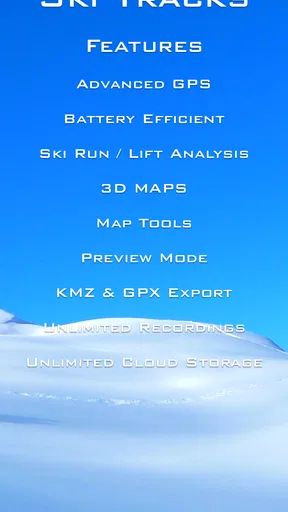
Our Review of Ski Tracks
 Analysis by Appyee
I decide whether a ski-tracking app is worthwhile by asking a practical question: will I actually use the record once the day is over? For me, the value is not just seeing a number for speed. It is being able to look back at where I skied, compare days in a useful way, and keep the phone out of my hands while I’m on the mountain. That is the kind of job Ski Tracks is built to do.
This is a free sports app from Fitness & Sports apps, with optional in-app purchases. It is rated for everyone, and its 3.4 average from around 8.9K ratings suggests a mixed reception rather than universal approval. I’d treat that as a reason to try it on a normal ski day before relying on it for a trip-long diary. The app has been around since Jan 12, 2013 and has over 500K installs, so it is a focused, established tool rather than a new all-purpose fitness platform.
What I would check before starting a day
My first decision is whether I want a passive record or active coaching. Ski Tracks suits the passive option: start a session, put the phone away securely, and review the outing later. It is not the same thing as an instructor, a navigation aid, or a live safety service. I would not use a speed reading to judge whether a run is safe, and I would keep normal mountain awareness and equipment as the priority.
Before setting off, I’d also make sure the phone is carried consistently and has enough battery for the day. A tracking record is only useful if the device stays with you and the session is running. I’d start with a short test run, then check that the activity appears as expected before leaving the phone tucked away for several hours. That small routine is more useful than discovering at the end of the day that I forgot to begin tracking.
Where it earns a place in my ski routine
The biggest appeal is that the app is dedicated to skiing rather than trying to make every sport look alike. Speed, distance, altitude, and performance are the details I naturally want to review after a day on snow. A general exercise log can be a better home for an overall workout history, but it may not make a ski day feel as easy to revisit as a purpose-built track record.
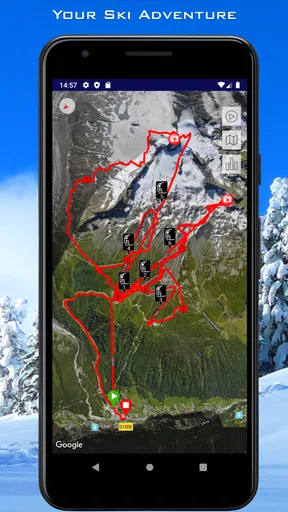
I find that especially useful on a repeat visit to a resort. Instead of trusting a hazy memory of which part of the mountain I explored, I can look at the recorded map and connect the day’s statistics to the routes I took. That does not replace a trail map or tell me what conditions are like now; it gives me a personal record of where I went. For someone learning the layout, that distinction matters.
On a realistic weekend outing, I’d start tracking before the first lift, leave the phone secured in a pocket, and avoid checking it between runs. At lunch I could decide whether the session is still running, then review the map and numbers at the end of the day. The best habit is to treat the app as a logbook, not a scoreboard. That keeps the phone from becoming a distraction and makes the saved record more meaningful.
How the record helps after the last run
Detailed statistics are most useful when I compare like with like. A long day with breaks is not directly comparable to a short session, and a maximum-speed figure on its own says little about technique or control. I would look at the map and the overall pattern alongside the numbers, then use them to remember what I actually skied. That is a more grounded way to learn from the app than chasing a personal best.
Photos can make that record more personal, especially when the map alone does not capture the weather, the people I was with, or the view from a stop. If I add pictures, I’d do it after skiing or during a proper break rather than while moving. Exporting a track is also useful when I want to keep a copy outside the app or share a day with friends. I would test the export workflow before depending on it for a long-term archive, then keep important records somewhere I can find them later.
Which alternatives make more sense for some skiers
The usual alternatives fall into a few broad groups: general fitness trackers, resort-focused apps, and a simple personal log. A broad fitness app may suit someone who wants skiing alongside running, cycling, or gym sessions in one place. A resort app may be the better everyday choice for someone whose priority is mountain information rather than a personal performance history. And a notes app or photo album can be enough for a skier who only wants to remember a trip without examining statistics.
Ski Tracks is strongest when I want a ski-specific record and do not need that record to be part of a larger fitness dashboard. The trade-off is that it may not match the habits of someone who already organizes every activity through a wearable or a single training service. If a connected ecosystem matters more to you than ski-focused tracking, I’d compare that existing setup first instead of assuming this app will replace it.
The small costs of using it well
Although the app is free to download, in-app purchases range from $4.99 to $49.99 per item. I’d use the free experience first and only consider paying if I can identify a specific feature I need. That is particularly sensible for occasional skiers: there is little value in paying simply because a purchase option is visible. For frequent days on snow, the decision should come after checking how the app fits your routine, not before.
There is also a small attention cost. Starting and ending sessions, checking the record, and deciding how to store or share it all take a little care. I would keep a simple habit: start before skiing, leave the phone alone, and review the day once I’m off the slopes. If you dislike maintaining any kind of activity log, even a capable tracker can feel like another chore.
Battery use is worth testing on your own phone rather than assuming every device will behave the same way. GPS tracking can make battery planning important on a long day, so I’d arrive with a charged phone and avoid treating the app’s record as more important than having enough power for ordinary communication. A small battery reserve is a sensible priority, especially when the cold and a full day outdoors are already part of the equation.
Who I’d recommend it to—and who should skip it
I’d recommend trying it if you ski often enough to enjoy comparing outings, like reviewing route maps, or want a record to share with friends after a day together. It can also suit a learner who wants to remember which areas they explored, provided they use the map as a recollection aid rather than as current navigation. The app’s everyone rating makes it broadly accessible, but the useful question is whether you enjoy reviewing data at all.
I’d skip it if you want live mountain guidance, a substitute for safety decisions, or a single unified dashboard connected to all your fitness gear. I’d also skip making it central to a day if you are not comfortable carrying a phone securely or checking its battery before heading out. In those cases, a resort-oriented tool, an existing wearable workflow, or simply taking a few photos may fit better than adding another tracking habit.
Tracking Every Turn and Twist
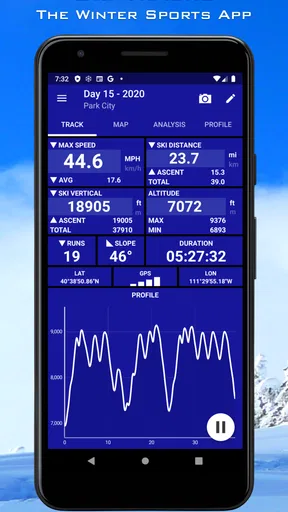
First things first, let's talk about the core functionality of Ski Tracks. This app is like having a mini ski coach in your pocket. It tracks everything from your speed, distance, and altitude to the number of runs you’ve completed. I was impressed by how accurately it logged my data, even when I was zipping down the slopes at full speed.
I found the interface to be super user-friendly. Once you hit the slopes, all you need to do is hit the start button, tuck your phone safely away, and let the app do its magic. And don't worry, it works offline too! So, even if you're in a remote location with no signal, Ski Tracks has got your back.
Detailed Analysis for the Data Geeks
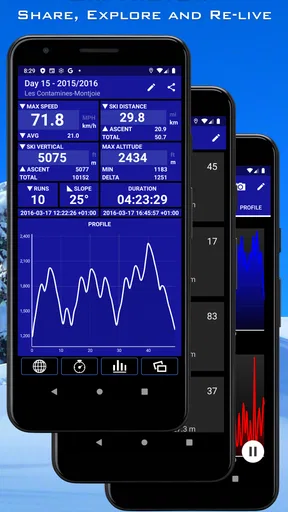
For those of us who love to dive into the nitty-gritty details, Ski Tracks provides comprehensive analytics. After a day out, I could review my maximum speed, total descent, and even the steepness of the slopes I tackled. It's like having a post-ski debrief that helps you understand your performance better.
The app also offers graphs and maps that visually showcase your skiing adventures. I particularly enjoyed seeing the GPS-tracked map of my runs, which brought back all the thrilling memories of each twist and turn.
Sharing the Thrill
One of my favorite features is how easily I can share my skiing stats with friends. Whether it's bragging rights or just to keep a record of your progress, Ski Tracks makes it a breeze. You can export your data and share it across various platforms. I found this feature particularly handy for those friendly competitions with my ski buddies.
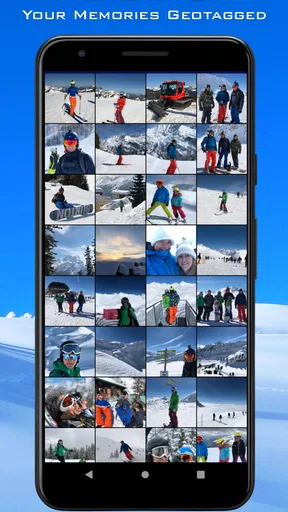
And if you're into keeping a ski diary, the app lets you add photos to your tracks. It’s a fantastic way to create a visual story of your skiing adventures over time.
Battery-Friendly and Intuitive
Now, you might be wondering about battery usage, especially since running a GPS app all day could be a drain. But Ski Tracks is surprisingly battery-efficient. I was able to track my entire day of skiing without worrying about my phone dying on me halfway through.
The app’s intuitive design deserves a shoutout too. Even if you're not tech-savvy, navigating through the app is straightforward. Features are clearly labeled, and there’s a helpful FAQ section if you ever get stuck.
Room for Improvement?
While Ski Tracks is packed with features, there are a couple of areas where it could improve. For instance, the app doesn’t currently offer integration with popular fitness trackers. It would be great to see this added in the future for those who like to keep all their fitness data in one place.
Additionally, while the app provides a wealth of information, some users might find the learning curve a bit steep initially. A more detailed tutorial could be beneficial for first-timers.
Final Thoughts
All in all, Ski Tracks is a must-have for any ski enthusiast who wants to enhance their experience on the slopes. From tracking your performance to sharing your adventures, this app covers it all. It's like having a little piece of the mountain in your pocket, ready to relive whenever you want.
If you're eager to take your skiing to the next level, give Ski Tracks a whirl. It's a small investment for a big boost in how you enjoy and remember your time on the snow.
Verdict
Strengths of Ski Tracks
- Tracks runs even without internet connection.
- Automatically detects ski lifts and runs.
- Detailed statistics on speed and altitude.
- Easy export to Google Earth and social media.
- Battery-efficient for all-day tracking.
Limitations of Ski Tracks
- Limited features in free version.
- No real-time weather updates.
- Interface can feel outdated.
- Occasional GPS inaccuracies.
- Not compatible with all smartwatches.
Similar Picks in This Category
View All
BeSoccer: Soccer Live Score
BeSoccer apps4.3

Cricbuzz - Live Cricket Scores
Cricbuzz.com3.7

NFL
NFL Enterprises LLC2.4

Da Fit
MO YOUNG LIMITED3.6

ESPN
Disney4.5

LiveScore: Live Sports Scores
LiveScore Limited4.5
Frequently Asked Questions
What is Ski Tracks and how does it work?
Ski Tracks is a GPS-based app designed for skiers and snowboarders. It works by tracking your movements on the slopes, providing detailed statistics on your speed, distance, altitude, and more. The app operates without requiring mobile data, making it ideal for use in remote mountain areas. Simply start the app before you begin skiing and check your stats at the end of the day.
Is Ski Tracks available for both Android and iOS devices?
Yes, Ski Tracks is available for both Android and iOS platforms. You can download it from the Google Play Store for Android devices and the Apple App Store for iOS devices. The app is designed to work seamlessly across both operating systems, offering the same features and user experience.
Does Ski Tracks require an internet connection to function?
No, Ski Tracks does not require an active internet connection to function. The app uses GPS to track your skiing activity, which means you can use it even in areas without mobile service. This feature makes it particularly useful for skiing in remote locations where connectivity might be limited.
What features does Ski Tracks offer to enhance my skiing experience?
Ski Tracks offers a range of features including real-time tracking, maximum speed, distance covered, altitude changes, and detailed maps of your ski routes. It also provides graphs and statistics that help you analyze your skiing performance. Additionally, you can share your achievements with friends through social media integration.
Are there any costs associated with using Ski Tracks?
Ski Tracks is available as a paid app, meaning there is an upfront cost to download it. However, this one-time fee grants you access to all of its features without any additional in-app purchases. This pricing model ensures that users can enjoy a comprehensive skiing tracking experience without ongoing expenses.
